
Turning a photograph into a 3D model used to be a research demo. In 2026 it is a paid button on half a dozen websites, and the question we get from clients has changed accordingly. It is no longer whether the tools work. It is whether what comes out of them can be used.
So we ran the test properly. One real product, four current generators, the same input for each, and then the same checks we run on any model that arrives from outside: the wireframe, the untextured surface, and the UV layout that decides whether the thing can ever be textured. This page is the full result, including the images we would normally keep to ourselves.
Contents
What we tested and how
The subject is a fabric backpack: soft panels, visible stitching, webbing, a front pocket, metal zip pulls and tubular handles. We picked it on purpose. Hard surface objects with flat faces flatter a generator, while fabric and small hardware expose a mesh within seconds.
Every tool got exactly the same input, four photographs from four sides, and every result went through the same three checks. If any of the words below are new, our guide to what 3D modeling is covers them in plain terms.
| Check | What it shows |
|---|---|
| Wireframe | Whether the mesh has a structure or is a dense field of triangles |
| Clay render | The real shape and detail with no texture to hide behind |
| UV checker | Whether the model can be textured at all |
We also ran each generator at every level of detail it offers, because the interesting failures appear when the tool compresses its own output.
Which tools we picked and why
There are dozens of image to 3D services now, and most are wrappers around a handful of models. We took four, on three conditions: the current version as of 2026, the ability to work from photographs rather than text prompts, and enough real usage that a client is likely to name them.
| Tool | Version tested | Why it is in the test |
|---|---|---|
| Meshy | 7 | The most widely used of the group and the most frequently named by clients |
| Tripo | V3.1 | Direct competitor to Meshy, accepts multi view input |
| Rodin 3D | V2 | Strong reputation on surface quality, single reference workflow |
| Hunyuan 3D | V3 | The strongest of the openly available models we could run |
The product and the four input views
This is the whole input. Nothing was modelled, cleaned or measured beforehand, and no tool was given anything the others did not get. Four views went in, front, left, right and back; the two side shots are near mirror images, so one of them stands for both here. Click a thumbnail to switch.
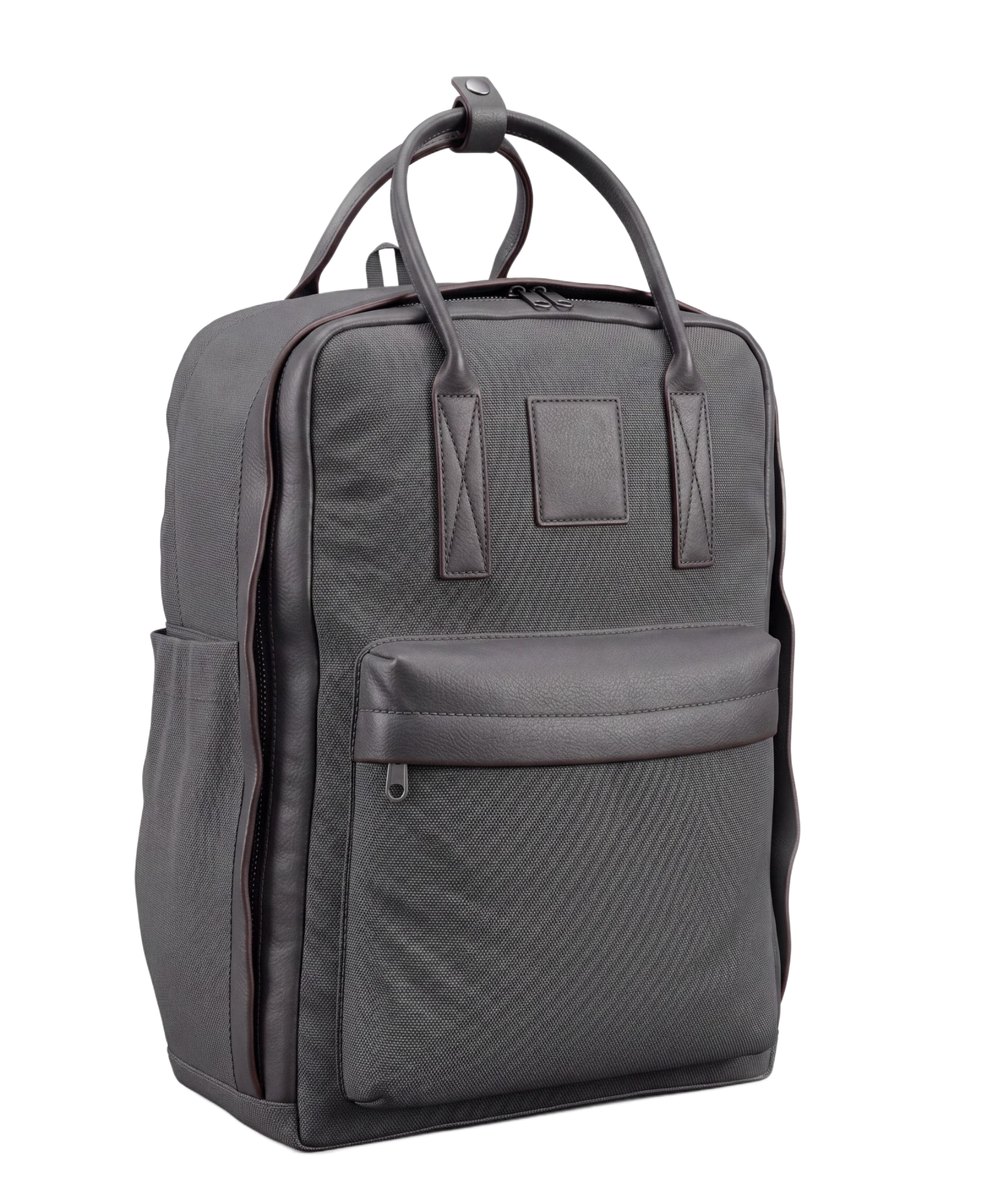
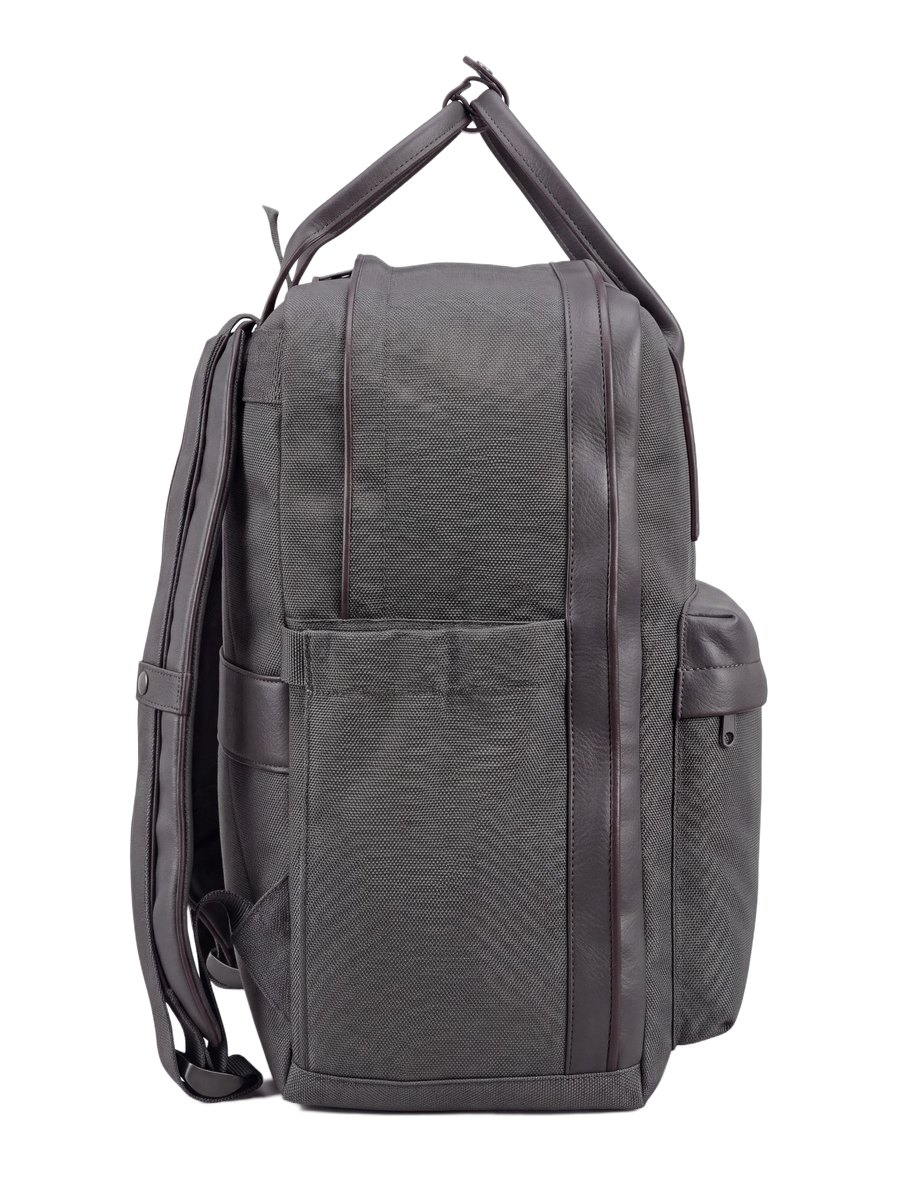
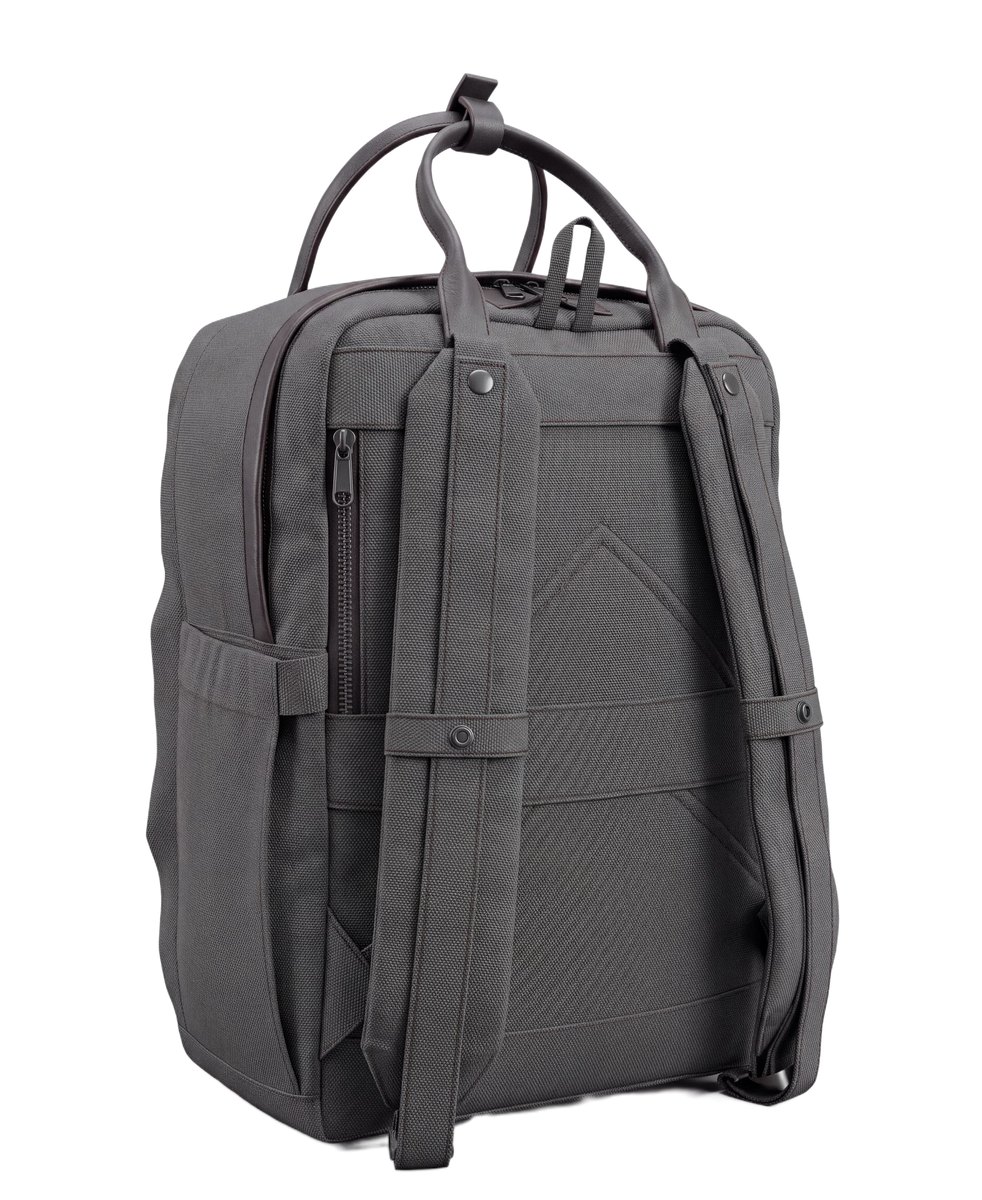
The number of views turned out to be the single biggest factor in the whole test. Given one photograph, a generator invents everything the camera could not see, and proportion and volume drift immediately. Given four, the shape holds together. Every result below came from these four images. Shooting references a modeller can actually work from is a subject of its own, written up in how to photograph textures for 3D.
Meshy 7
Meshy returned the most convincing surface of the four. At full density that is 3 000 000 polygons, and the detail is genuinely there: the fabric reads as fabric, the stitching is legible, the pocket and the handles sit where they should.

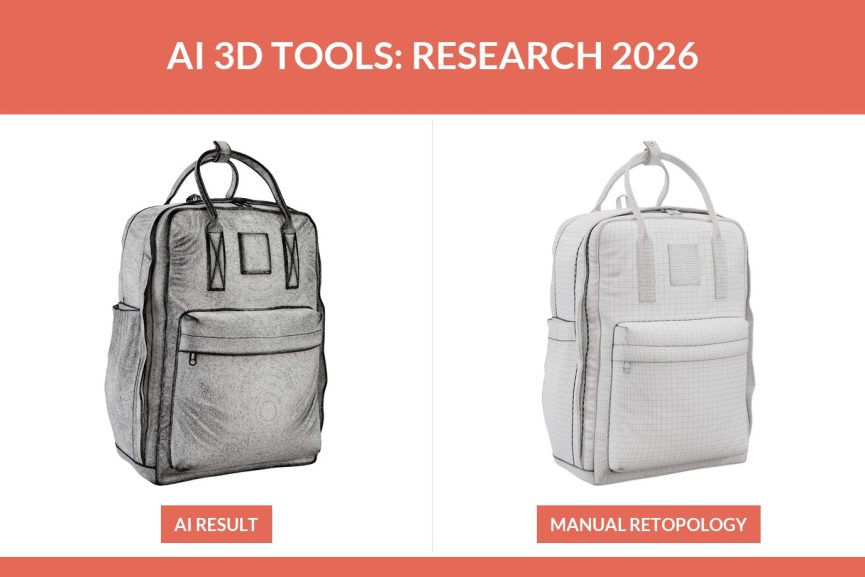
High poly, 3 000 000 polygons. The mesh is so dense it reads as a grey field with no structure.

The same model as untextured clay. Detail holds up well.
That density is also the first problem. Three million polygons with no edge flow cannot be textured by hand and cannot carry a usable UV layout. As it stands, the model is a reference object: good to look at, impossible to finish.
Meshy knows this and offers its own retopology. At the mid setting it rebuilds into quads at 100 000 polygons, and at the low setting it triangulates down to 30 000.

Mid poly, automatic quad retopology, 100 000 polygons. Cleaner mesh, and the detail from the high poly version is gone for good.

Mid poly clay. Softer edges, shallower stitching.

Low poly, triangulated remesh, 30 000 polygons.

Low poly clay. Visible shading artefacts on the curved panels.
Both retopologised versions share the defect that decides the whole test: the geometry is merged. Parts that should be separate objects, the pocket, the webbing, the handles, are welded into one continuous skin. A UV unwrap on a merged mesh is not hard to attempt, it is simply pointless. Retopology by hand is a craft with its own toolset, and the packages that do it are compared in our review of 3D modeling software.
Tripo V3.1
Tripo accepts multi view input, so it starts on equal footing with Meshy on proportions. At full density it returned 2 000 000 polygons.

High poly, 2 000 000 polygons.

High poly clay. The form is right, the detail is a step below Meshy.

Mid poly after automatic retopology, 50 000 polygons.

Mid poly clay. Same merged skin as the Meshy equivalent.
Softer edges, less definition in the stitching and the smaller hardware. Its automatic retopology behaves exactly like Meshy: lighter mesh, lost detail, still merged.
Rodin 3D V2
Rodin produced a clean looking 1 000 000 polygon model, and it carries one limitation that outweighs any quality argument: it takes a single reference image. There is no way to give it four views.

High poly, 1 000 000 polygons, generated from one photograph.

The clay render. Surface quality is good, proportions drift where the reference did not reach.
Everything the one photograph did not show has to be guessed. For a product that must match a real object on a shop page, that is a hard limit rather than a setting you can turn up.
Hunyuan 3D V3
Hunyuan takes multi view input and returned 1 500 000 polygons with detail close to Meshy. On pure geometry it was the closest competitor in the test.

High poly, 1 500 000 polygons.

Clay render. Very close to Meshy, slightly less crisp on the small hardware.
The mesh has the same structural problem as the rest. As a starting point to rebuild from, though, it is genuinely good.
What manual modeling produced
For the comparison to mean anything, the same backpack was also built the way we build models for clients: geometry that follows the object, quads flowing along the panels, separate parts kept separate, polygons spent where the detail is and nowhere else. The full list of what separates a production model from a pretty one is in our 3D modeling standards.

The manually built model. Fewer polygons than any AI result in this test, and the only one that can be textured.
The difference is invisible in a preview and obvious the moment you apply an even checker pattern. That test is the whole argument in two images.

Checker on the AI generated mesh. Squares stretch and shear wherever the geometry is welded together.

The same checker on the manually built model. Even squares, consistent scale across the whole surface.
This is why AI texturing on generated models looks the way it does. The tool paints onto a surface with no sensible coordinate space, so the result cannot be corrected, only regenerated. It is also why you cannot ask for the same fabric in four colourways: there is no clean place to apply them. What a correct material setup actually involves is in our guide to 3D model texturing.
Side by side
| Tool | Polygons | Multi view input | Detail | Mesh structure | Usable UV |
|---|---|---|---|---|---|
| Meshy 7 | 3 000 000 | Yes | Best in test | Merged | No |
| Hunyuan 3D V3 | 1 500 000 | Yes | Very close behind | Merged | No |
| Tripo V3.1 | 2 000 000 | Yes | Acceptable, softer | Merged | No |
| Rodin 3D V2 | 1 000 000 | No, one image | Good surface, drifting proportions | Merged | No |
| Manual modeling | Lowest of all | Four views plus measurements | Matches the product | Clean quads, parts separated | Yes |
On the generators alone: Meshy 7 first for detail and clarity of form, Hunyuan a close second, Tripo third. Rodin sits apart, because its single image input changes the job rather than the quality.
Where AI already works and where it does not
The honest summary is not that these tools are bad. It is that they solve the first part of the job and not the second, and the two parts are easy to confuse until you open the file.
Where they already work
In every case below the model is looked at rather than used, so structure never becomes the bottleneck and the result costs minutes.
- Concept and volume studies. You need to see the shape in space and judge proportions. Nobody opens the mesh, so what it looks like inside does not matter.
- Mood boards and pitch decks. An object to place in a layout, replaced by the real model later if the idea survives.
- Background props. Anything far from camera and out of focus. The older answer still works here too, which is buying a ready made model.
- Blocking out a complicated organic form. Generation gives a starting volume in minutes that would take hours to sculpt, and it gets rebuilt afterwards anyway.
Where they do not
Every case below fails for the same reason: merged geometry with no logical structure, so there is no correct UV layout and therefore no controllable texturing.
- Anything that has to be textured. Materials are applied through the UV layout. Without one, AI texturing is the only route, and it cannot be corrected, only regenerated.
- Colourways and finishes. Showing one product in twelve fabrics needs separate, addressable parts. On a welded skin there is no clean place to put them.
- Configurators and AR. Both need a light model with named parts. Three million welded polygons is the opposite of that.
- Anything another artist has to pick up. A mesh with no edge flow cannot be edited, only replaced.
- Matching a real product exactly. Dimensions come from CAD or measurement, not from inference off photographs.
Polygon count fixes none of it, and neither does automatic retopology: it trades away detail for a cleaner looking mesh that is still welded together.
The practical conclusion for a complex product is that generation and manual work are stages, not alternatives. A three million polygon Meshy result is a poor deliverable and a very good reference to rebuild from, which is roughly the role a 3D scan has played for years.
That rebuild is what we do. Models are built to real dimensions with topology that survives texturing and edits, from your CAD, drawings or photographs. A simple part starts at 80 USD and a typical product is around 200 USD, billed at 20 USD per hour. The detail is on our 3D product modeling services page, and the checks we ran on every result above are the same ones in our guide to 3D model quality issues.
There is one place where these generators earn their keep on a real product, and it is not the product itself. Once the model exists, the scene around it can be generated instead of built: same machine, a different kitchen every time. That is a separate service, AI background generation, and it works precisely because the product in the frame is a file rather than a guess.
Frequently asked questions

Ian Diev
Content Writer, Editor
Ian loves writing about innovative 3D technologies and their impact on architecture and design. In his spare time, he makes indie music, watches obscure movies, and cooks culinary masterpieces for friends.